

Agencies
Add your customers and manage them from the agency dashboard.
Set the Default Banner Colours
Pick the banner background and button colours for new customers.
Table of contents
back
to the top
Open Branding
Open "Branding" in the sidebar. Only agency admins see this page.
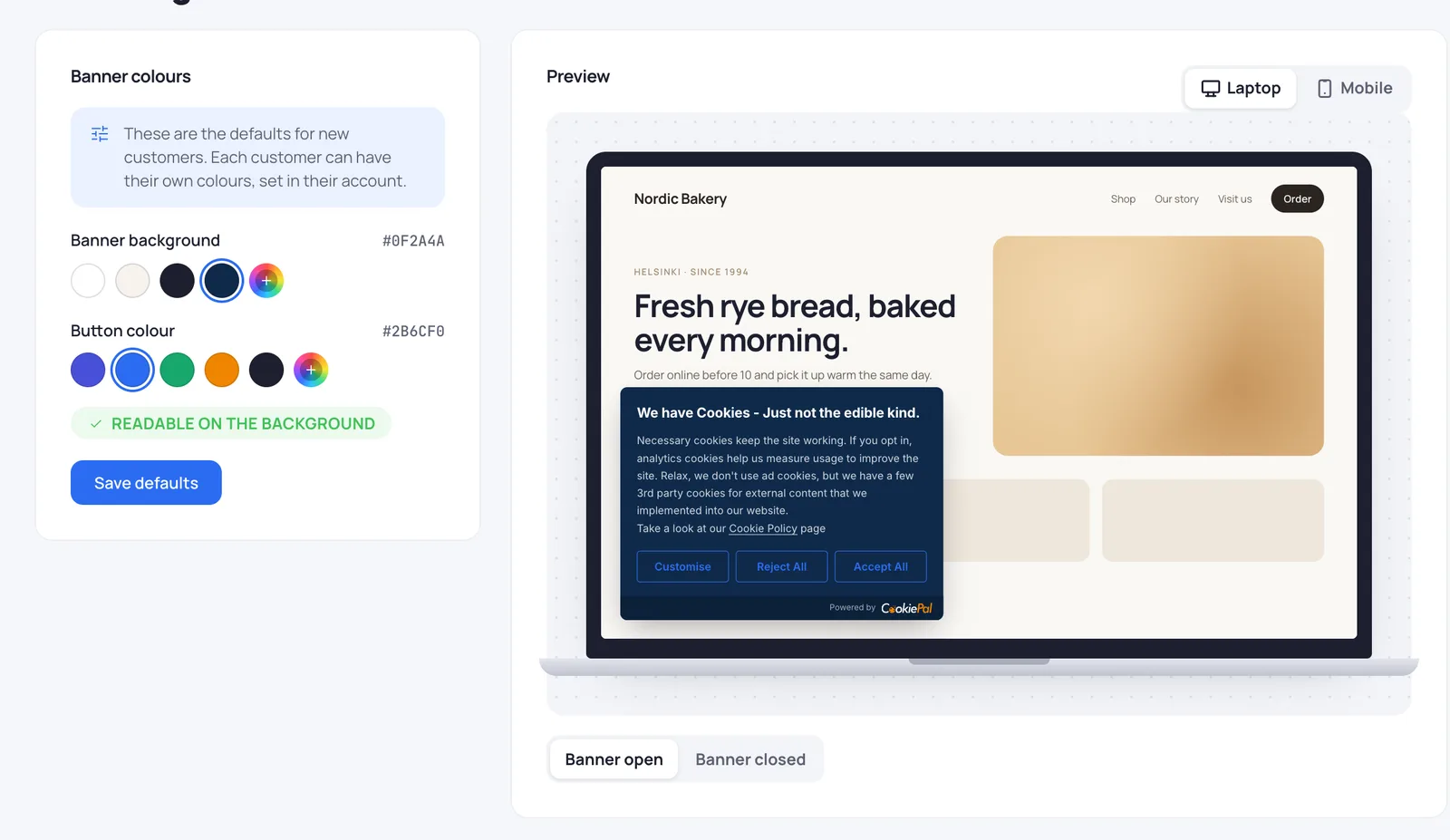
Pick the Banner Background
Under "Banner background", click one of the swatches. The colour wheel at the end lets you pick any colour.
Pick the Button Colour
Under "Button colour", choose a swatch or a custom colour the same way. A green "Readable on the background" label means visitors can read the buttons. If it says "Hard to read on this background", pick another colour.
Check the Preview
The preview shows a customer's site with your colours. Switch between "Laptop" and "Mobile", and between "Banner open" and "Banner closed". Click any banner button in the preview to close the banner. The cookie button then reopens it.
Save the Defaults
Click "Save defaults". These colours are the defaults for new customers. Each customer can have their own colours, set in their account.
Any Questions Left?
Feel free to contact us and we will answer all of yours remaining questions!
Contact Us