

Why Your CookiePal Page Views Differ from Google Analytics
June 8, 2026
•

2 min read
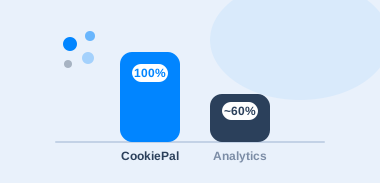
Table of contents
back
to the top
Why Your CookiePal Page Views Differ from Google Analytics
If you’ve compared the page-view count in your CookiePal dashboard against Google Analytics, you’ve probably noticed they don’t match, and that CookiePal’s number is higher.
This is one of the most common questions we get. The short answer is that the two tools measure different things on purpose, so your numbers aren’t wrong.
In this guide, we cover:
- What CookiePal counts as a page view
- How and when page views are counted
- When your count resets and what happens at your limit
- Why CookiePal and Google Analytics show different numbers
What is a page view?
A page view is counted every time someone opens a page on your website where your CookiePal banner is installed. Each time a page is loaded or reloaded, that counts as one page view.
How is a page view counted?
CookiePal records a page view every time a page containing your CookiePal code loads. Whenever a visitor opens, refreshes, or navigates to a page with the banner, it counts as one page view.
The count includes all of your visitors, whether they accept, reject, or ignore your cookie banner.
Are page views counted even if the visitor doesn’t interact with the banner?
Yes. We count every page view, whether or not the visitor clicks or interacts with the cookie banner.
This is intentional. Your banner has to load for every visitor so that everyone gets the chance to make a consent choice, and the page-view count simply reflects how many times that happened.
When does the page-view count reset?
Your page-view count resets at the start of each billing month. You can see your current usage and your plan’s monthly limit at any time in your CookiePal dashboard.
What happens if I reach my page-view limit?
We’ll let you know as you approach your monthly limit so there are no surprises. If you expect more traffic, you can upgrade your plan at any time to raise the limit, and your usage resets at the start of the next billing month.
Why do CookiePal and Google Analytics show different page-view counts?
It’s normal for the page-view number in CookiePal to be higher than the one in Google Analytics (or similar tools), because the two measure different things.
How CookiePal counts. CookiePal counts every page load that includes your CookiePal script. Every visitor is included, whether they accept, reject, or ignore the banner.
How Google Analytics counts. Analytics tools only begin recording page views after a visitor consents to analytics cookies. Visitors who reject the banner, ignore it, or leave before choosing are not included in those reports. Ad blockers and privacy browsers can also stop analytics tools from recording a visit, but they don’t stop your CookiePal banner from loading.
Why they differ. CookiePal counts every page load while analytics tools count only consented visits, so CookiePal will usually report a higher number. This isn’t an error. It reflects each tool’s purpose: CookiePal measures every consent opportunity (every visitor who could see your banner), while analytics tools measure the behavior of visitors who opted in.
Final takeaway
Your CookiePal page views and your Google Analytics page views will rarely match, and they’re not supposed to. CookiePal measures every visitor who could see your banner, while Google Analytics measures the ones who opted in.
Explore further

Browser Fingerprinting Explained: Why It Still Matters for Privacy
Fingerprinting can recognise a browser without storing a cookie, so your banner may not cover it. Learn how it works, when consent applies and how to audit your scripts.
October 29, 2026
10 min

Link Decoration and Tracking Parameters: The Privacy Issue Marketers Miss
Click IDs and UTM parameters can carry identifiers through URLs, forms and servers. Learn when link decoration needs consent, how URL passthrough fits and how to audit it.
October 29, 2026
9 min
Do A/B Testing Tools Require Cookie Consent?
A/B tests can store IDs, share events and feed ad audiences. Learn when experiments need consent, when a narrow exemption may apply and how to run tests without ignoring privacy.
October 22, 2026
9 min